 © Copyright 2026 IGNOU Galaxy.

IGNOU Registration: Fresh Admission and Re-Registration Explained Step by Step
“Registration” at IGNOU means two different things: applying for a programme for the first time on the Samarth admission portal, and re-registering every year or semester to move to the next stage. They use different portals, different logins and different deadlines. This guide walks through both, with the exact upload sizes, payment options and contacts IGNOU lists.
Registration vs re-registration
Fresh registration (admission)Done once, when you join a programme. You create an account on the Samarth admission portal, fill the form, upload documents and pay the fee. Once IGNOU confirms admission, you get your enrolment number.
Re-registrationDone before every new year or semester of the same programme. It is reached from the Re-Registration section of the Samarth student portal, and IGNOU also lists a separate re-registration portal, onlinerr.ignou.ac.in. You choose courses where options exist and pay that stage’s fee.
Re-registration is what moves you from one year or semester to the next, so keep an eye on its deadline every session.
Which portal to use
| You want to | Official portal |
|---|---|
| Apply for an ODL (distance) programme | ignouadmission.samarth.edu.in |
| Apply for an online programme | ignouiop.samarth.edu.in |
| Apply as a foreign student for an online programme | ignouforeigniop.samarth.edu.in |
| Apply for a PhD | ignou-phd.samarth.edu.in |
| Re-register for your next year or semester | The student portal (ignou.samarth.edu.in › Re-Registration), or onlinerr.ignou.ac.in, which IGNOU also lists under Admissions |
| Check whether your admission is confirmed | isms.ignou.ac.in (Registration Status) |
All of these are linked from ignou.ac.in › Student Services › Admissions. The programme list, eligibility and fees are in IGNOU’s Common Prospectus, linked at the end of this guide.
Sessions and current status
IGNOU admits students in two cycles a year, January and July. Here is where things stood when this guide was checked:
| Fresh admission, July 2026 cycle (ODL) | Closed. The Samarth portal shows “Registration Process for JULY 2026 session over.” |
|---|---|
| Re-registration, July 2026 session | The last date was extended to 30 September 2026 with a late fee of ₹200. |
| January 2027 cycle | Not announced on the portals at the time of checking. Watch ignou.ac.in for the notice. |
Fresh admission, step by step
These are the stages IGNOU lists in its own admission FAQ for the Samarth portal.
- Open the admission portalGo to ignouadmission.samarth.edu.in when the cycle is open.
- RegisterRegistration creates your username and password, which are sent to you by SMS and email. An email address is compulsory.
- Log in againUse the username and password you received.
- Fill the admission formThe form is saved stage by stage with the “Save” button.
- Upload photo, signature and documentsSizes and formats are in the next section.
- Read and accept the declarationTick the declaration box after reading the instructions.
- Preview and confirmCheck every detail, especially programme, medium and address, before moving on.
- Pay the feeUse a credit card, debit card or net banking. A confirmation is sent by SMS and email.
- Download your formAfter final submission, download the filled form and keep a printout.
If your connection dropsData is saved at the end of each stage. Anything typed in the stage you were on when the connection failed is lost, so log in again and restart from that stage.
Photo and document sizes
| Upload | Format | Maximum size |
|---|---|---|
| Recent passport-size photograph | JPG | 100 KB |
| Specimen signature | JPG | 100 KB |
| Each supporting document | JPG or PDF | 200 KB |
Scan documents in advance and compress them to these limits before you start.
Paying the fee
The admission FAQ says the programme fee can be paid by credit card, debit card or net banking, and names Visa and Mastercard as accepted cards.
Money deducted, no confirmation?Email the transaction details (control number, your name, programme, mobile number and amount) to IGNOU’s Centralised Student Registration Cell at csrc@ignou.ac.in, or call 011-29571528. If it is still not resolved, raise a grievance on igram.ignou.ac.in.
After you submit
- IGNOU staff scrutinise your form. If you meet the eligibility criteria, you get a confirmation at your registered email address.
- If something is missing or wrong, IGNOU writes to you about the discrepancy.
- Forms are processed region-wise on a first-come, first-served basis, so the time to confirmation varies between regional centres.
- Once processed, the university sends details of your admission confirmation, study centre and induction.
Checking your registration status
- Open Know Your StatusOn ignou.ac.in, go to Student Services › Know Your Status.
- Click “Check your registration status”This opens the Registration Status page on isms.ignou.ac.in.
- Enter the details askedCheck whether your admission has been confirmed and note your enrolment number.
Your study material is dispatched only after confirmation. Our IGNOU book status guide explains how to track it.
Re-registration, step by step
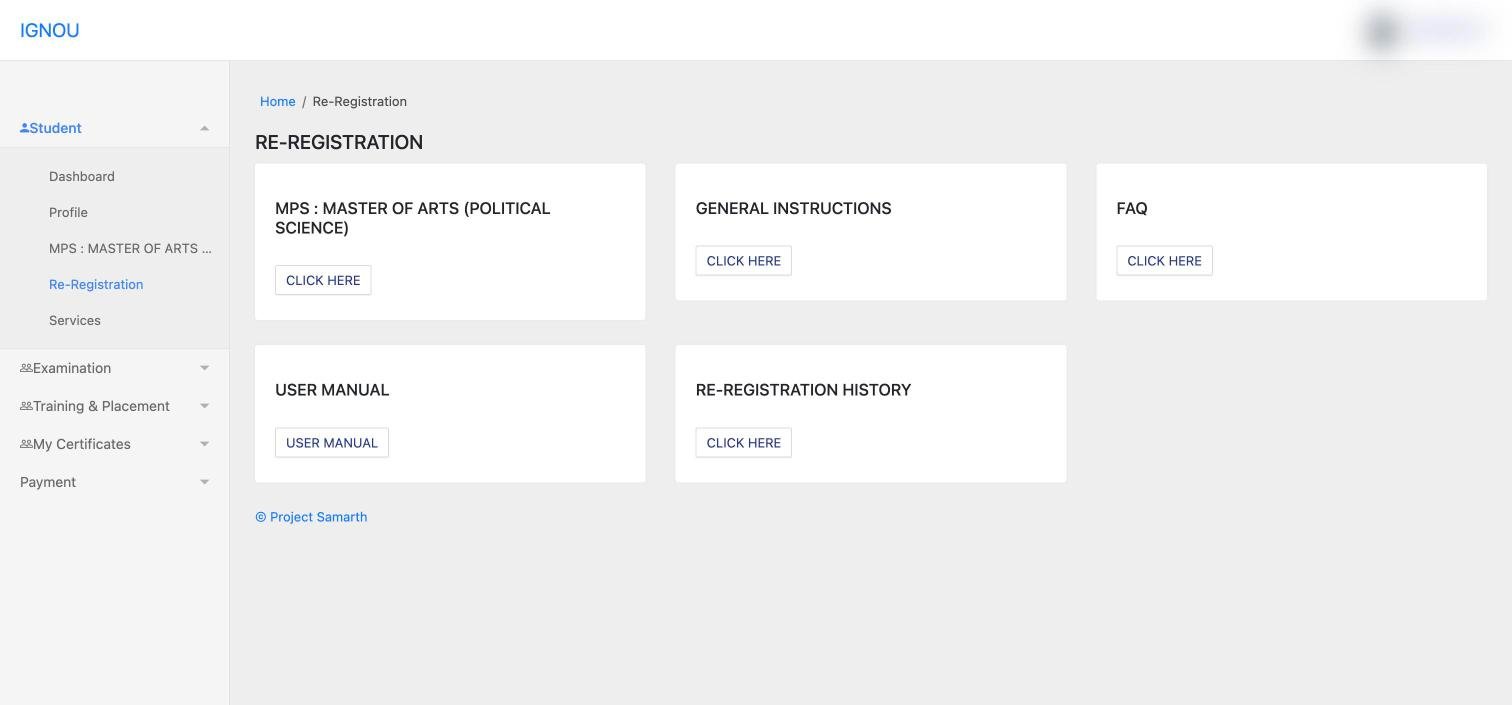
On the student portal, go to Student › Re-Registration and use the card for your programme when the window is open. The same page links to IGNOU’s instructions, FAQ, user manual and your re-registration history. The steps below are for the separate onlinerr.ignou.ac.in portal, as published by IGNOU on that site.
- Open onlinerr.ignou.ac.inRead the instructions and tick the box confirming you have understood them.
- Create an account (first time only)Click “New Registration”. Give a mobile number and email you use, because confirmations and updates are sent only to these.
- Log inReturning students use the same username and password every time.
- Choose your coursesWhere the form gives options, pick them using your Programme Guide. IGNOU warns that changing courses later can cost you study time.
- Pay onlineCard, net banking and UPI (including the BHIM app) are accepted.
- Save the printoutKeep a printout of the submitted form and the payment confirmation.
Re-registration rules to know
- Login problems: if you are not getting the OTP, or have forgotten your username or password, your regional centre resets the account or updates your email and mobile number.
- Payment not updated: do not pay again straight away. Wait a day, check the payment status, then decide.
- Paid twice: IGNOU states that one of two payments made for the same application will be refunded to your account.
- Using a cyber café: check that the right courses were selected and that payment went through, and take a printout before leaving.
- Do not wait for the last date. IGNOU says this on the portal itself, and late fees apply after the deadline.
Credits and study hours
IGNOU follows a credit system. One credit equals about 30 hours of study, which includes reading the material, audio and video, counselling sessions and writing assignments. A 4-credit course therefore means roughly 120 hours of work. Use this to plan how many hours a week each course will need once you are registered.
To complete a programme, you have to finish the assignments, practicals and projects (where they apply) and pass the term-end exam for every course.
Programme validity, extensions and re-admission
Every IGNOU programme has a minimum and a maximum duration. The BCA (BCA_NEW programme page), for example, lists 36 months as the minimum and 72 months as the maximum: three years of normal study and six years to finish. Your registration is valid only up to the maximum duration. After that you cannot keep re-registering or sitting term-end exams on the same enrolment unless the university approves it.
Students often ask whether IGNOU adds one extra year after the maximum duration. The current programme information has no rule that gives every student an automatic extra year. Older programme guides did carry a re-admission scheme: eligible undergraduates in programmes of two years or more could get two more years by applying for re-admission and paying the prescribed fee. That was a past provision, not a promise for your batch.
If your validity is close to running out, check the current Common Prospectus and your programme page first, then write to your regional centre (or raise a request on iGRAM) with your enrolment number before the validity date passes.
Changing an elective, specialisation or programme
These are three different requests, and IGNOU treats them differently.
- Elective or course change. The Common Prospectus has a separate “Change of Elective/Course” provision. It lets you replace a registered course with another option your programme allows, on the conditions it sets.
- Specialisation change. Where a specialisation has its own programme code, changing it is not an elective change. The July 2026 Common Prospectus states that students in a dedicated MBA specialisation programme cannot change their specialisation.
- Programme change. Moving from one degree to another usually means cancelling the current admission and registering afresh. Do not assume that fees already paid or credits already earned will carry over.
If you picked the wrong elective, read the Change of Elective/Course rules in the current prospectus, then contact your regional centre with your enrolment number and the course codes involved.
Withdrawal and refund
IGNOU has a limited provision for cancelling admission and refunding fees, set out under “Refund of Fee” in the University Rules section of the Common Prospectus. If the university itself refuses admission, the fee is refunded after deducting any processing fee, back to the card or bank account used for payment.
Frequently asked questions
Do I need an email address to register?
Yes. IGNOU’s admission FAQ says an email address is required to register for online admission.
Are the admission and re-registration logins the same?
No. Admission is on ignouadmission.samarth.edu.in. Re-registration is reached from the student portal (ignou.samarth.edu.in) or the separate onlinerr.ignou.ac.in portal, which has its own account.
Can I pay by UPI?
The re-registration portal accepts UPI, including BHIM. The admission FAQ lists credit card, debit card and net banking for the programme fee.
My fee was deducted but the portal shows nothing. What now?
For admission, email csrc@ignou.ac.in or call 011-29571528 with your transaction details. For re-registration, wait a day and check the payment status before paying again.
How long does admission confirmation take?
There is no fixed time. Forms are processed region-wise on a first-come, first-served basis, so it varies by regional centre.
What happens if I skip re-registration?
You do not move to the next year or semester of your programme until you re-register. Late re-registration attracts a late fee, as with the ₹200 late fee for July 2026.
Are IGNOU degrees recognised?
IGNOU’s admission FAQ states that its degrees, diplomas and certificates are recognised by UGC and by member universities of the Association of Indian Universities.
Official links
ODL admission portal (Samarth)ignouadmission.samarth.edu.in
Re-registration portalonlinerr.ignou.ac.in
Registration statusisms.ignou.ac.in
Admission FAQignouadmission.samarth.edu.in/faq
Common Prospectus (July 2026)ignou.ac.in (PDF)
iGRAM grievance portaligram.ignou.ac.in
Choosing a programme? Read our IGNOU admission guide and how the two sessions compare.