 © Copyright 2026 IGNOU Galaxy.

IGNOU Grade Card Status: How to Check It and Read Every Column
The IGNOU grade card status page shows, course by course, the marks the university has recorded for your assignments, practicals and term-end exams, and whether each course is complete. You only need your programme code and enrolment number. We checked a real grade card and blurred the student’s details, so you can see exactly how the page looks and what each column means.
What the grade card status page is
IGNOU publishes it at gradecard.ignou.ac.in, linked from ignou.ac.in › Student Services › Results › Grade Card. It is a running record that is updated as results are processed. The page we checked was headed “Grade Card Status as on 28-10-2026”, which tells you the date of the last update.
ImportantThe page itself says the status is indicative only and cannot be used as a substitute for the final grade card. The final grade card is issued after you complete the programme and all prescribed components are updated. The page also states that this electronically generated information has no legal validity.
Pick the right programme group
The first drop-down, “Grade Card Status for”, splits programmes into four groups. Choosing the wrong group is the most common reason students cannot find their programme code.
| Group | Programme codes inside |
|---|---|
| For BCA/MCA/MCA_NEW/MP/MPB/PGDCA/PGDCA_NEW/NEW PROGRAMME MBA/MBF | BCA, BCAOL, BCA_NEW, BCA_NEWOL, MBF, MCA, MCAOL, MCA_NEW, MCA_NEWOL, MP, MPB, PGDCA, PGDCA_NEW, PGDHRM, PGDFM, PGDOM, PGDMM, PGDFMP |
| For BDP/BA/B.COM/B.Sc./ASSO Programmes | ASSO, BA, BCOM, BDP, BSC (older, non-CBCS bachelor’s programmes) |
| For CBCS Programmes | BAECH, BAEGH, BAG, BAHDH, BAHIH, BAPAH, BAPCH, BAPSH, BASOH, BAVTM, BCOMG, BCOMOL, BSCANH, BSCBCH, BSCG, BSWG, BSWGOL |
| For Other Programmes | Everything else: 725 programme codes when we checked, including MA, MSc, MCom, diplomas and certificates (for example, MPS for MA Political Science) |
TipIf you study BA or BCom under CBCS (BAG, BCOMG and so on), use the CBCS group, not the BDP/BA/B.COM group, which is for the older programmes.
How to check your grade card status, step by step
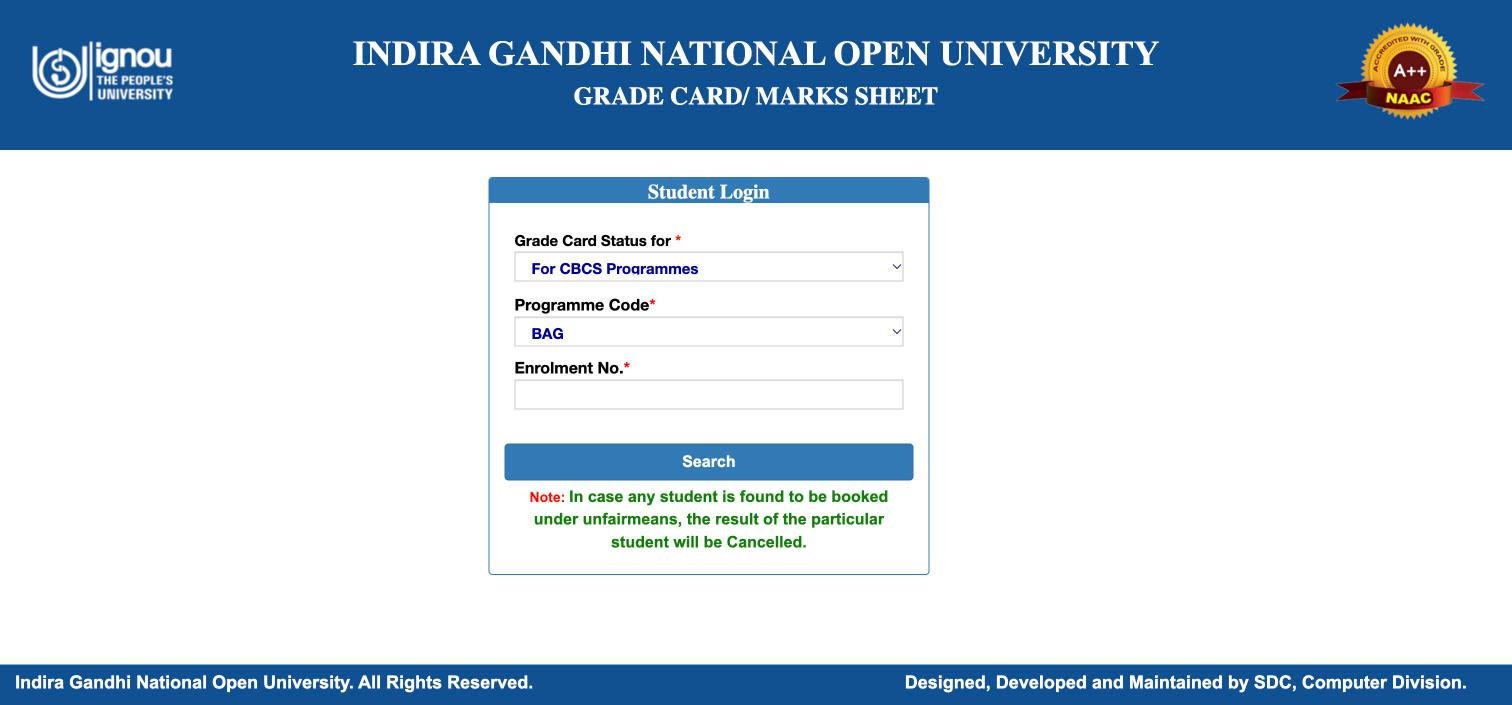
- Open gradecard.ignou.ac.inOr go to ignou.ac.in › Student Services › Results › Grade Card.
- Choose your groupSelect the right option under “Grade Card Status for”, using the table above.
- Choose your programme codeThe “Programme Code” list fills in after you pick a group.
- Enter your enrolment numberType it exactly as on your ID card.
- Click SearchYour course-wise status opens. Use the print icon on the page if you want a copy, and the Logout button when you are done.
Reading your grade card
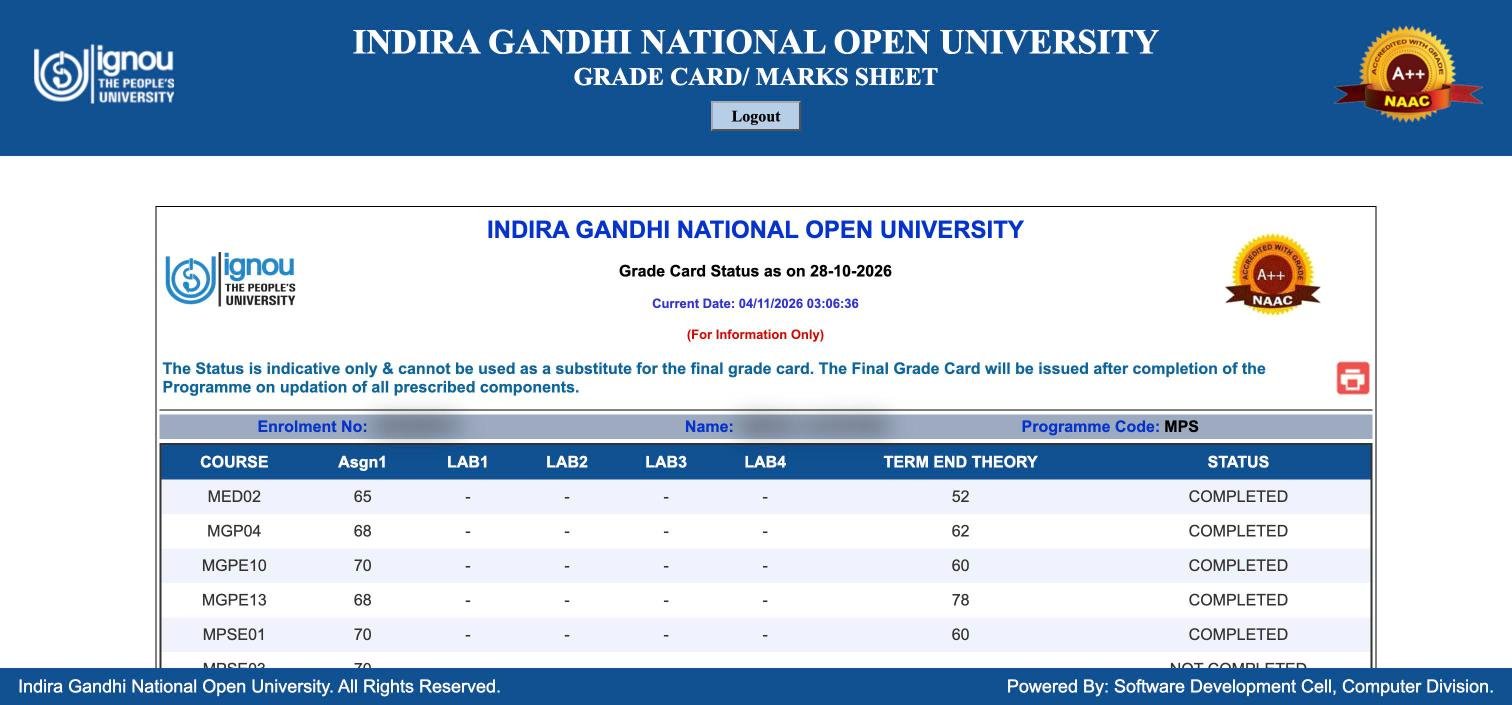
The top line shows your enrolment number, name and programme code. Below it, each row is one course:
| Column | What it shows |
|---|---|
| COURSE | The course code, for example MPSE01 or MGP04 |
| Asgn1 | Your assignment marks for that course |
| LAB1 to LAB4 | Practical or lab components. A dash means the component does not apply to that course. |
| TERM END THEORY | Your term-end exam marks |
| STATUS | COMPLETED or NOT COMPLETED |
The page notes that Assignment 4 and TE Practical do not apply to all courses, so empty columns are normal for many programmes. Columns can differ between programme groups, especially for programmes with practicals.
Completed vs Not Completed
In the grade card we checked, eight courses showed COMPLETED and three showed NOT COMPLETED. The three incomplete courses had assignment marks (70, 67 and 72) but a dash under TERM END THEORY. In other words, the assignment was done but no term-end marks were recorded yet.
COMPLETEDEvery component required for that course has been recorded with qualifying marks.
NOT COMPLETEDAt least one component is missing or not yet passed. Look along the row to see which column is empty or low.
A course stays “Not Completed” until both parts are in place. Submitting the assignment alone is not enough, and neither is passing the exam alone.
Pass marks and what counts
Passing rules differ by programme, so check your programme guide for the exact figures that apply to you. Our guide on IGNOU passing marks explains the common rules and how assignment and exam marks combine. Re-check the grade card after every result: if a course turns “Completed”, you do not need to reappear in it.
Marks missing or wrong: what to do
Assignment marks are missing
Assignment marks are sent by your study centre after evaluation. Keep your assignment submission receipt and contact the study centre first, then your regional centre. Our guide to checking assignment status covers this.
Term-end marks are missing
Check the term-end result page (below) for that exam session. Results for some courses come out later than others, and the grade card is updated after each result is processed. The date at the top of the page tells you when it was last updated.
Marks look wrong
If you believe a term-end mark is wrong, IGNOU offers re-evaluation, with its results listed separately on the results page. See our re-evaluation guide. For record errors that are not about evaluation, raise a grievance on iGRAM (igram.ignou.ac.in).
Term-end result vs grade card
IGNOU publishes term-end results on a separate page, termendresult.ignou.ac.in. It asks for:
- Result For: Term-End Exam (TEE) or Re-evaluation
- Session: for example June 2026, December 2025 or June 2025 (older sessions back to December 2020 are listed)
- Enrolment number
The term-end result shows your marks for one exam session. The grade card combines all sessions with your assignment and practical marks and tells you whether each course is complete. Check the result first after a session ends, then the grade card once it has been updated.
Final grade card and degree
Once every course in your programme shows completed, IGNOU issues the final grade card and you become eligible for convocation. The degree itself is awarded at convocation, which you have to register for separately. Our convocation guide explains how.
Frequently asked questions
What do I need to check my IGNOU grade card?
Your programme group, programme code and enrolment number. No password is needed.
Why can’t I find my programme code?
You have probably chosen the wrong group. CBCS bachelor’s programmes (BAG, BCOMG and others) are under “For CBCS Programmes”, and most master’s, diploma and certificate programmes are under “For Other Programmes”.
Is the online grade card valid as a marksheet?
No. The page states it is for information only, has no legal validity, and cannot replace the final grade card.
What does a dash (-) mean on the grade card?
Either the component does not apply to that course or no marks have been recorded for it yet. Look at the STATUS column to see whether the course is complete.
My assignment marks show but the course is Not Completed. Why?
The course also needs qualifying term-end marks. If TERM END THEORY shows a dash, the exam result has not been recorded or you have not yet passed it.
How often is the grade card updated?
It is updated as results are processed. The “Grade Card Status as on” date at the top shows the latest update.
Where do I check re-evaluation results?
On termendresult.ignou.ac.in, by choosing “Re-evaluation” and the session.