 © Copyright 2026 IGNOU Galaxy.
Download and Use Your New IGNOU Identity Card: Complete Guide
IGNOU identity card is an important document for every enrolled student. It confirms your enrolment details and may be required for examinations, counselling, practical classes, library visits and other university related activities.
Once the admission is confirmed, students need to register themselves on the IGNOU Samarth Student Portal and create their student account. The current Common Prospectus directs the admitted learners to use this portal for post admission services.
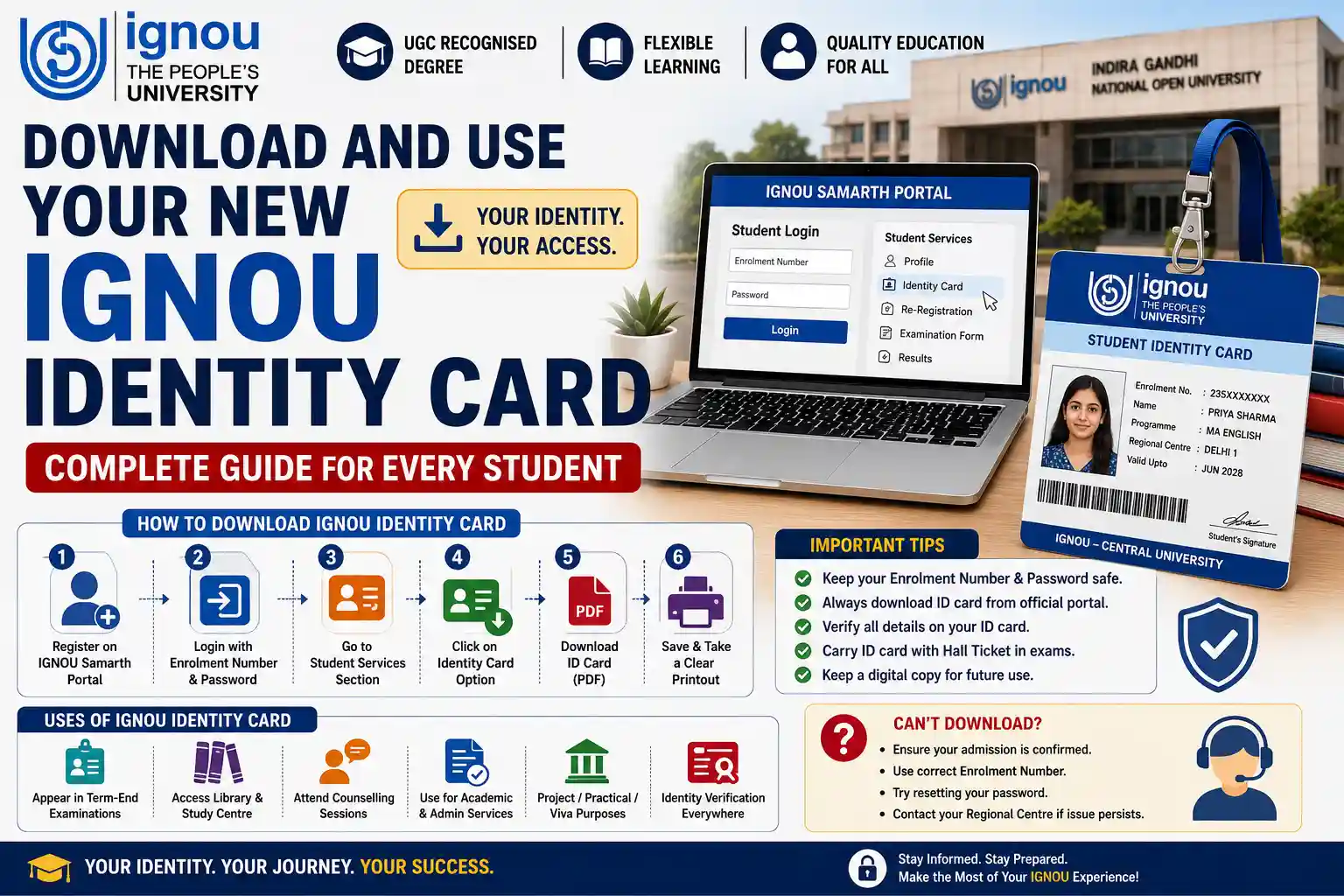
Confirm Your Admission First
Generally you can download IGNOU identity card only after IGNOU confirms your admission and creates your enrolment record.
Before you try to download the card you need to have the following details:
- Confirmation of admission
- Enrolment no.
- Correct Programming of the code
- Mobile number registered
- Valid e-mail address
- Details of Regional Centre & Study Centre.
Note: Do not confuse the enrolment number with the application control number. The control number is used for tracking the admission application The enrolment number is your permanent student reference for the programme
Download and save your enrolment no.
IGNOU Id Card Login Many academic services require your enrolment number.
Store it in at least two safe places e.g.:
- Your mobile
- Registered e-mail account
- Personal document files
- Admission confirmation page printout
You’ll need it for assignments, examination forms, results, grade cards, projects and student grievances too.
Procedure to Download IGNOU ID Card
The New IGNOU Identity Card is generated online and can be downloaded and printed by student. IGNOU Student Registration Division said that student identity card is issued digitally.
How to Download IGNOU ID Card
- Visit the IGNOU Samarth Student Portal.
- If you haven’t created a student account, choose the new-registration option.
- Enter your registered Enrolment Number, Program Details and Contact Details.
- Set up a username and password.
- Sign in to your student account.
- Go to student services or profile section.
- Check for the download option of your identity-card.
- Download card as pdf
- Download the PDF securely.
- Print a readable copy for examinations and academic visits.
As per the latest IGNOU programme guide, the official website for downloading the student ID card is Samarth Student Portal.
What details are mentioned in the IGNOU student I card?
The exact layout may vary but an IGNOU Student ID Card usually contains important learner information such as:
- Student name
- Student enrolment
- Programming code
- Bild
- Admission or programme information
- Regional Centre details
Check the card you downloaded. If the name, photograph, programme or enrolment number is not correct, please report the problem through the appropriate student-support channel.
Do not modify the PDF. A tampered identity card can be considered invalid.
How to Use IGNOU Identity Card
The identity card is more than a downloadable admission record. It is used for verifying that you are a registered IGNOU learner.
You might need it for:
- Entry to the Term End Examination centre.
- Academic or counselling appointments
- Workshops & Labs
- Library facilities
- Study Centre/Regional Centre Visits
- Procedures related to project, internship or viva
- Collection of academic papers
- Some applications for student services.
Sometimes in instructions for online projects, students are specifically asked to use the enrolment number as it is mentioned on the ID card.
IGNOU ID Card for Exam
The candidate should bring a printout of the identity card and clear printout of hall ticket to the examination centre.
The hall ticket also shows the date and centre of examination. The ID card validates you are a student. It is not to be confused that one document replaces the other.
Before going for the exam check:
- Both the documents with enrolment no.
- Program and courses information
- Date and time of the exam
- Examination centre address
- View photos
Keep the documents in a clear folder, to protect them from damage.
What If I Cannot Download the ID Card?
Students may face problem of login or download due to incomplete registration in portal, error of details or delay in updating admission record.
Try these steps.
- Confirmation Admission approval.
- Check the enrolment number again.
- Registered email id and mobile no to be used.
- Reset password through authorised option.
- Try a different browser or device.
- Try clearing your browser cache and try again.
- If the record is not available, contact the Regional Centre;
Samarth Student Portal is generally used by students from July 2019 onwards. There may be different facilities for older batches. Official Regional Centre guidance still has a separate ID-card download service for July 2019 and earlier learners.
Read the Programme Guide Closely
Download your ID card and view your program guide. It includes course structure, credits, assignments, examinations, practicals and programme duration.
Don’t be fooled by the ID card into thinking all academic requirements are satisfied. It just checks you are a student and you are enrolled on a programme.
Study Material Access
Sort your printed and electronic study materials by course code. Don’t wait for the date sheet to start your study.
For student friendly explanations and academic updates one can visit IGNOU Galaxy. But the official notifications and programme documents of IGNOU should be the main source.
How to Submit IGNOU Assignments Before the Deadline IGNOU Assignments Submission
Download assignments for correct programme, course code and session. Write your own answers and submit in the approved manner.
IGNOU Solved Assignments help you to understand the answer structure and IGNOU Handwritten Assignments help you on presentation. They are for academic reference only not to be copied verbatim.
Keep the assignment submission receipt till the marks are reflected on your grade card.
Don’t Miss Out on Important Dates and Deadlines
Keep a calendar of:
- Re-enrolment
- Submit assignment
- Exam forms
- Practicals
- Submission of projects
- Admit cards
- Updates to results and grade-card
The examination form is now being submitted through Samarth Student Portal for the relevant examination session. It is necessary that one has secure access to the portal.
Fill IGNOU Exam Form
Eligible Subjects Separate Exam Form. Downloading of Identity Card does not automatically register you for the Term-End Examination.
Check all the course codes before payment and keep the acknowledgement of examination-form.
Send Summary or Project
Students enrolled on programmes with projects, dissertations, internships or fieldwork must follow the prescribed procedure.
Some IGNOU Projects are for help in general topic selection and structure. But the official project manual, synopsis-approval rules and submission instructions are to be followed.
Start Preparing for the Exam Months Before
Follow this easy preparation plan:
- Course by course study syllabus course.
- revision notes briefly Make brief revision notes
- Old question papers.
- Practice structured answers
- Watch your weak points.
- Prepare the ID card and the examination papers.
Errors to Avoid
- Download the card on admission confirmation
- Use the enrolment number not the control number.
- Opening multiple student accounts
- Editing information on the downloaded pdf
- Carrying only the examination hall ticket
- Not a readable copy
- Sharing your portal passwords with others
- Disregard incorrect information on the card
Questions & Answers
1. How to Download IGNOU id card?
Download it from your account at the IGNOU Samarth Student Portal.
2. Is it possible to download the card before admission confirmation ?
Usually not. First, your admission and enrolment record needs to be created.
3. Whether the digital IGNOU ID card is valid?
Yes. IGNOU provides student identity card online for download and print.
4. Do you need to laminate the card?
Does not require lamination. For most purposes a clean and undamaged print is sufficient.
5. Must I show the identity card on examinations?
Students should carry it with the Hall Ticket for identification purpose.
6. Have you got an application control number to log in?
Nope. You usually ask for your enrolment details on student portal.
7. What if my photo is incorrect?
Report the discrepancy to your Regional Centre or recognised student support centre.
8. Can I display the ID card on my phone?
Please also bring a printed copy as there may be requirements at the examination centre which a mobile version will not satisfy.
ID card will be valid for the whole semester? H3: 9.
This is generally related to the programme you are enrolled in but students must complete it within the validity period of the programme.
10. What if I am from an earlier admission batch?
If you are a mature student you may need to use the legacy ID-card facility, or contact your Regional Centre.
Conclusion
How to Download IGNOU Identity Card First you have to confirm your admission and save your enrolment number and register on IGNOU Samarth portal. Download the PDF, verify all the details and keep a digital and hard copy.
The card is to be carried along with the hall ticket during the examinations and to be preserved throughout the programme. A correct registration in the portal and a careful storing of documents will save you from unnecessary complications later on.