 © Copyright 2026 IGNOU Galaxy.

Home › Regional centres and student services › Grievances and iGRAM
Raising an IGNOU Grievance on iGRAM: From First Ticket to Resolution
DSBy Deepshikha Singh, Chief Content Manager, IGNOU Galaxy
Updated 11 November 2026 · 4 min read
Picture two tickets arriving at the same desk. One says: “My result is wrong, please check urgently.” The other says: “Enrolment 2xxxxxxxx, MA History (MAHI), course MHI-103, June 2026 TEE. Assignment submitted at study centre 07xx on 12 March; grade card shows assignment as not submitted. Receipt attached.” The first will probably get a polite, general reply. The second tells the person reading it exactly what to check. That difference, more than anything else, decides how useful IGNOU’s grievance system is for you.
(That’s an illustration of the kind of tickets our team sees, not a real student’s ticket.)
First: is iGRAM the right door?
iGRAM, IGNOU’s Grievance Redressal and Management portal, is for registered students. Some problems are faster to fix elsewhere, though, and a few can’t be fixed by a ticket at all.
| Fix it yourself | Raise an iGRAM ticket | Needs the RC or headquarters |
|---|---|---|
| Change of address, study centre or Regional Centre: the July 2026 Common Prospectus says these can be requested online through your Samarth account | Missing assignment marks, results, study material, hall tickets, re-registration, migration, convocation and degree issues: iGRAM has a category for each | Changes that need an official decision. In our team’s experience, corrections and small changes are resolved quickly, but subject changes and study-centre or RC changes take longer. Some details, such as the category recorded at admission, generally can’t be changed afterwards without approval from IGNOU headquarters. |
One ticket, start to finish
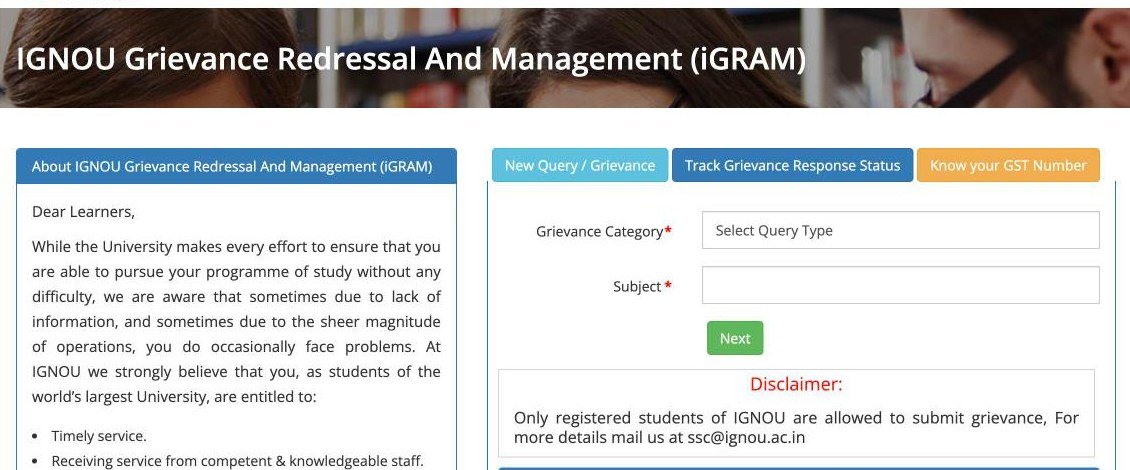
STAGE1
Open the portal
Go to igram.ignou.ac.in and choose New Query / Grievance. The portal itself notes that only registered IGNOU students can submit, and gives ssc@ignou.ac.in for other queries.
STAGE2
Pick the narrowest category
The category list is long, and the most common mistake is choosing something broad like “Examination” or “Others” when a precise one exists. The current list includes Assignments, Study Material, Practicals, Projects, Re-Registration, Migration Certificate, Mark Sheet & Provisional Certificate, Re-evaluation, Answer script photocopy, Convocation, Degree/Diploma, Name Correction, Change of Programme and Change of Correspondence Address, among others. Pick the one that names your problem.
STAGE3
Write it so it can be checked
Include your enrolment number, programme and course codes, the exam session, what you expected, what actually happened, and what you’ve already tried, with dates. Attach or quote any receipt. Keep it to facts; one clear paragraph is better than a long letter.
STAGE4
Save your GST number
When the ticket is submitted, iGRAM gives you a reference called a GST number. Write it down. You’ll need it for Track Grievance Response Status, and if you lose it, the Know your GST Number tab helps you find it.
STAGE5
Read the reply properly
Check whether the reply says the problem has been fixed, or only that it has been forwarded to another section. If it was forwarded, note where to, and wait a reasonable time before following up with the GST number. If the reply doesn’t address what you asked, raise a fresh ticket that quotes the old GST number and explains what’s still wrong.
Three drafts you can adapt
Replace the brackets with your own details. These are starting points, not official templates.
Assignment marks missing
Enrolment [number], [programme code], course [code], [session] TEE.
Assignment submitted at study centre [code] on [date] (receipt attached).
Grade card shows assignment as not submitted / marks not updated.
Please update the assignment marks for this course.
Result not updated after re-appearing
Enrolment [number], [programme code], course [code].
Re-appeared in [session] TEE; hall ticket [number if available].
Grade card still shows the earlier attempt.
Please update the result for [course code] for the [session] attempt.
Study material not received
Enrolment [number], [programme code], [semester/year].
Fee paid on [date]; study material for [course codes] not received at
[address]. Please confirm dispatch details or arrange delivery.
When a ticket isn’t enough
If a ticket goes unanswered or the reply doesn’t solve the problem, move up one step at a time. The contacts below are from IGNOU’s July 2026 Common Prospectus.
- Your Regional Centre. Most student records sit with the RC, and many problems are fixed fastest there. Contacts for every RC are in our regional centres guide.
- Student Service Centre, IGNOU HQ: 011-29572514, 29572513, 29572516; ssc@ignou.ac.in.
- The relevant HQ desk: for general exam grievances and duplicate mark sheets, sedgrievance@ignou.ac.in; for degree and convocation issues, convocation@ignou.ac.in.
- The Government’s public grievance portal (pgportal.gov.in), as a last resort once IGNOU’s own channels have been tried.
From our support desk
One student changed his Regional Centre, but the change didn’t show up in his Samarth account. Tickets didn’t move it. He went back to his previous RC in person, and the change was completed within two days. Sometimes the office that holds your file is the fastest route.
If your problem is a degree that hasn’t arrived, our guide on convocation and your degree explains the separate degree-delivery portal before you raise a ticket.
Sources checked 11 November 2026
- iGRAM portal (tabs, categories, GST number, eligibility note)
- IGNOU Common Prospectus, July 2026 (Student Service Centre and HQ contacts; online change requests via Samarth)