 © Copyright 2026 IGNOU Galaxy.

Home › Guides › IGNOU results
IGNOU Term-End Result and Grade Card: Where to Check, What It Means, What to Do Next
SSBy Shreyansh Shylendran, Founder and CEO, IGNOU Galaxy
Updated 12 November 2026 · 9 min read
IGNOU puts your exam outcome in two different places, and they don't show the same thing. The term-end result shows how you did in one exam session. The grade card status shows every course in your programme, with your assignment grade, your exam grade and whether IGNOU counts the course as complete. Checking the wrong one is an easy mistake, and it can make a result look missing when it isn't.
This guide shows both pages as they look today, using an MBA student's record with the name and enrolment number masked. It explains what each column means, what "Not Completed" and a missing course can mean, how results arrive, and which IGNOU desk to contact when something looks wrong.
IGNOU Galaxy is an independent academic-support service, not part of IGNOU. Every lookup below happens on IGNOU's own websites.
Which IGNOU page should you check: the term-end result or the grade card?
| Term-end result | Grade card status | |
|---|---|---|
| Where | termendresult.ignou.ac.in | gradecard.ignou.ac.in |
| What it covers | One exam session only (for example, June 2026) | Every course in your programme, across all sessions |
| What it shows | Your term-end marks or grade per course, the date each was updated, and remarks | Assignment grade, lab or project grade, term-end grade, and a status for each course |
| Best for | Finding out whether a paper you appeared in has been declared | Checking which courses are complete and what is still pending |
| What the page says about itself | "The Status is indicative only" | "For Information Only"; the final grade card is issued after you complete the programme |
Neither page replaces the documents IGNOU issues to you. The final grade card and provisional certificate are the formal record of your marks; the online pages are a preview of it.
How do you check your IGNOU term-end result?
- Open termendresult.ignou.ac.in.
- Under Result For, choose TERM-END-EXAM (TEE). The other option, RE-EVALUATION, is for re-evaluation results.
- Under Term-End Exam Result For, pick the exam session you appeared in, such as June 2026.
- Type your enrolment number and press Search.
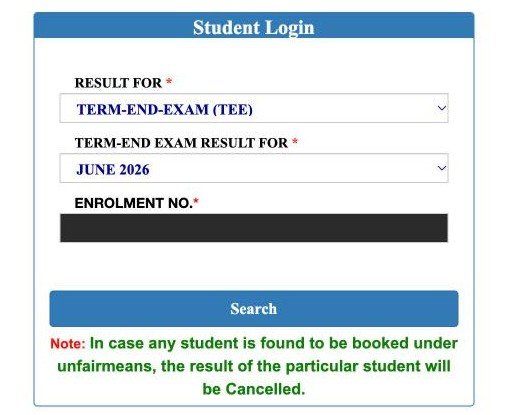
The list of sessions goes back several years, so you can also look up an older session, for example to track a course you reappeared in.
What does the term-end result page actually tell you?
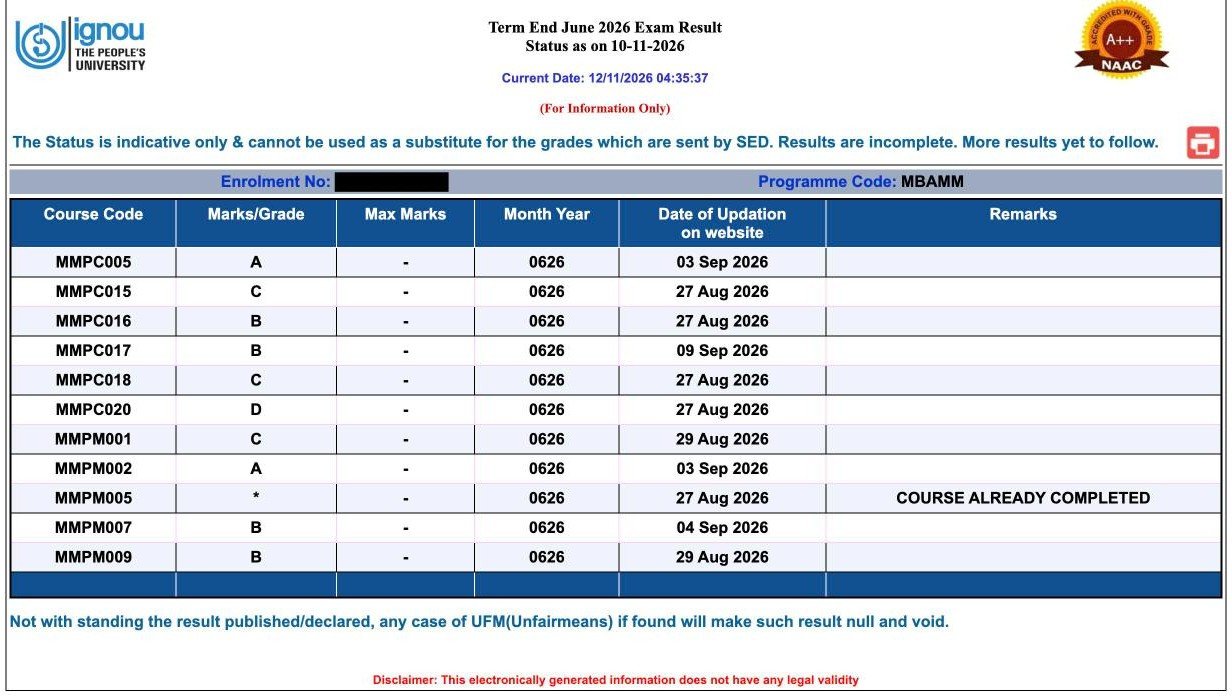
Each row is one course. The columns mean:
- Marks/Grade: your term-end result for that course. Some programmes show marks, others a letter grade; this MBA record shows grades.
- Month Year: the exam session, written as 0626 for June 2026.
- Date of Updation on website: when that course's result was added. On this record, results were added on different dates, course by course.
- Remarks: usually empty. On this record, one course shows an asterisk with the remark COURSE ALREADY COMPLETED. IGNOU's June 2026 date sheet explains the rule behind it: if a learner who has already passed a course appears in it again, the "result will not be declared in any case, and no fee refund will be done."
Two lines on the page are worth reading closely. "Results are incomplete. More results yet to follow" means a course missing from the list may not be declared yet. And the note that "any case of UFM (Unfairmeans) if found will make such result null and void" is why we have a separate guide to UFM in IGNOU results.
How do you check your grade card status, and how do you read it?
- Open gradecard.ignou.ac.in.
- Under Grade Card Status for, choose your group. The portal offers four: BCA, MCA, PGDCA and some other programmes; BDP, BA, B.Com and B.Sc; CBCS programmes; and Other Programmes.
- If asked, choose your Programme Code. The MBA (Marketing Management) record shown here is under Other Programmes, as MBAMM.
- Enter your enrolment number and press Search.
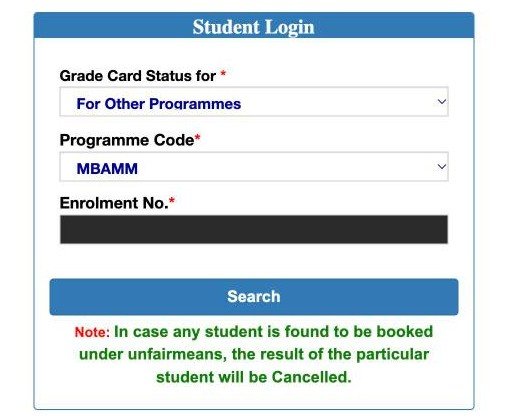
If your record doesn't appear, check the group and programme code first, then try again.
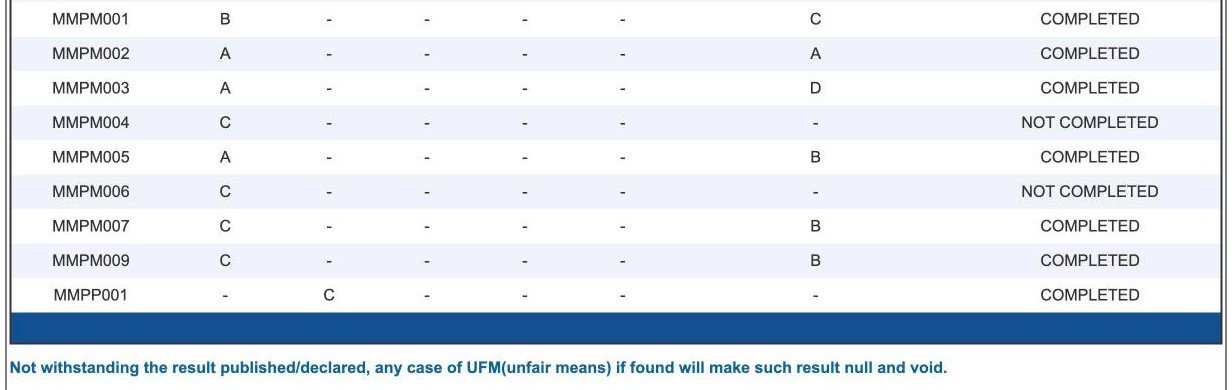
The columns are Asgn1 (assignment grade), LAB1 to LAB4 (practical, lab or project components, where a course has them), Term End Theory, and Status. A dash means no grade is shown for that component: either it doesn't apply to the course, or nothing has been recorded yet. In the screenshot, the project row has a grade under LAB1 and dashes elsewhere.
What does "Not Completed" mean on the IGNOU grade card?
"Not Completed" means the record, as displayed, doesn't yet meet the course's completion requirements. It doesn't by itself tell you why. A component may be pending, missing from the record, or below the pass requirement for your programme. Use the row to decide what to check:
| What you see in the row | What to check |
|---|---|
| Assignment grade shown, term-end column is a dash | No term-end result is displayed for this course. Check the term-end result for the session you appeared in, and whether you did appear in this course |
| Term-end grade shown, assignment column is a dash | No assignment grade is displayed. Check your submission receipt, then ask your study centre or Regional Centre whether the marks were sent |
| Both grades shown, still Not Completed | One component may be below your programme's pass requirement, a grade may still be updating, or there may be a discrepancy in the record. Read the passing marks guide, then contact IGNOU if the grades should have been enough |
| Course missing from the list | Check you chose the right group and programme code, that you are registered for the course, and that the portal has updated, before escalating |
One detail that surprises students: in the MBA record above, several courses show an assignment grade of B and a term-end grade of D, and are COMPLETED. That is consistent with the MBA handbook's rule that a course needs an overall C grade, though the letter grades alone don't show the exact marks. Other programmes use other rules; our passing marks guide works through two of them with numbers.
How long does IGNOU take to declare results?
The MBA Student Handbook says term-end results are declared within 45 days, as a tentative schedule. On the record shown above, the June 2026 exams ran from 1 June to 21 July 2026, and this student's results were added on dates between 27 August and 9 September 2026, a few courses at a time.
So a single course missing a few weeks after your last paper may simply not be updated yet. Check again after the next update before you write to anyone.
Why isn't your result showing, or why hasn't it updated?
Work through these in order:
- Wrong session or group. On the term-end page, check the session. On the grade card page, check the group and programme code.
- Not declared yet. If the page says results are incomplete, wait for the next update.
- A component not recorded. A missing assignment or practical grade keeps a course Not Completed even after the exam result appears.
- Eligibility to appear. The prospectus says a learner who has exhausted the maximum duration of a programme should not apply for the term-end exam, and that otherwise "the result would be with held". The MBA handbook lists the other conditions: valid registration, assignments submitted on time, minimum course time completed, and the exam fee paid.
- Course already completed. A further attempt at a passed course isn't declared, as the date sheet says.
- A UFM case. If you were booked for unfair means, the result can be cancelled. See our UFM guide.
If none of these explain it, write to the right desk. These are the result-related contacts in section 18 of the July 2026 prospectus:
| What the prospectus lists the desk for | Phone | |
|---|---|---|
| Result of master's and bachelor's programmes; grade card and provisional certificate; practical marks of all programmes | 011-29572212, 011-29536103 | mdresult@ignou.ac.in, bdresult@ignou.ac.in, practicalsed@ignou.ac.in |
| Result of master's, bachelor's and diploma programmes; grade card and provisional certificate | 011-29572211, 011-29536743 | bdresult@ignou.ac.in, dpresult@ignou.ac.in |
| Result of DPE and certificate programmes; grade card and provisional certificate | 011-29572208, 011-29536405 | cpresult@ignou.ac.in |
| Discrepancy in the grade card, or grade/marks not updated | 011-29572208, 011-29572211, 011-29572212 | mdresult@, bdresult@, bdpresult@, dpresult@ or cpresult@ignou.ac.in |
| Assignment marks | 011-29571325, 011-29571319, 011-29571313 | assignment@ignou.ac.in |
| Project report status, dissertation or viva marks | 011-29571324, 011-29571321, 011-29532294 | projects@ignou.ac.in |
| Verification of grade card or provisional certificate; transcript | 011-29572210, 011-29536405 | gcverification@ignou.ac.in |
| UFM cases | 011-29572208, 011-29576405 | ufmgroup@ignou.ac.in |
| General grievances; duplicate mark sheet | 011-29572218, 011-29571313 | sedgrievance@ignou.ac.in |
The prospectus doesn't say which programme each address in the "discrepancy" row covers. Use the desk whose row matches your programme level, and write to one address, not all of them. Include your enrolment number, programme code, course code, exam session and a screenshot of what the portal shows. If you get no reply, our iGRAM guide shows how to raise a formal ticket.
When do you get the final grade card and provisional certificate?
The online grade card status is for information only. The page itself says the final grade card "will be issued after completion of the Programme on updation of all prescribed components", which includes projects, practicals and any other component your programme has, not only exams and assignments.
Once every component shows as complete, check the issue or dispatch status of your final documents, and contact the grade card desk above if they remain outstanding. The degree itself comes later, through convocation; our convocation guide covers that. The MBA handbook and BCOMF guide list a fee of ₹200 for a duplicate grade card if the original is lost or damaged.
What can you do if your result isn't what you expected?
| Situation | Your option | Guide |
|---|---|---|
| You didn't pass a course | Reappear in a later term-end exam, or resubmit the assignment, depending on which part | If you fail a course |
| You think the exam was under-marked | Apply for a copy of the answer script, re-evaluation, or both | Re-evaluation and answer-script copy |
| You are just short of a division | The improvement scheme, if you meet its conditions | Re-evaluation guide, improvement section |
| You have been selected for a job or further study and need marks early | Early declaration, for a fee | Re-evaluation guide, early result section |
| Your result shows UFM, or is cancelled | Contact the UFM section and respond to any notice | UFM in IGNOU results |
| You can't tell whether you passed | Check the pass rule in your programme guide | Passing marks and calculator |
Questions students ask us about results
Can I use the online result printout for a job or admission?
The online status isn't a substitute for the documents IGNOU issues. Both portals call their information indicative or for information only, and the term-end result page adds that it "does not have any legal validity". If you need to show something before your final documents arrive, ask the receiving institution what it accepts provisionally.
My friend's result is out and mine isn't. Is something wrong?
Not necessarily. On the record above, results were added on several different dates, so two students who appeared in the same session can see their results on different days.
Only my assignment marks are missing. Who do I contact?
Start with your study centre or Regional Centre, which sends assignment marks on. If that doesn't settle it, the prospectus lists an assignment-marks desk at assignment@ignou.ac.in (011-29571325).
Sources checked 12 November 2026
- IGNOU term-end result portal and grade card portal, viewed 12 November 2026
- IGNOU Common Prospectus, July 2026 (section 14.19 eligibility, section 18 contacts)
- MBA Student Handbook and Prospectus 2026 (pass rule, result timing, exam eligibility, duplicate grade card)
- Date sheet for June 2026 term-end examination (exam dates; further attempts at passed courses)