 © Copyright 2026 IGNOU Galaxy.

IGNOU ID Card Download: Step-by-Step with Screenshots
Your IGNOU identity card is a PDF you download from the Samarth student portal. There is no separate ID card website and nothing to pay. We followed the process on a real student account and captured each screen, with personal details blurred, so you can match what you see.
Quick answer
| Where | ignou.samarth.edu.in › Services › ID-CARD |
|---|---|
| Format | Password-protected PDF |
| PDF password | Your enrolment number (IGNOU’s own note on the download page says so) |
| Fee | None |
| One card per | Programme. Each programme you are registered in appears as its own row. |
Before you start
- Your admission must be confirmed. The card is generated against your enrolment.
- You need your Samarth student portal login. If you have never logged in, create an account with New Registration on the login page.
- Keep your enrolment number handy. You will type it again to open the PDF.
- A PDF reader on your phone or computer. Most browsers can open password-protected PDFs.
Download steps with screenshots
- Log in to the student portalGo to ignou.samarth.edu.in and sign in with your username, password and the captcha shown.
- Open ServicesFrom the left menu, choose Student › Services. You land on a grid of service tiles.
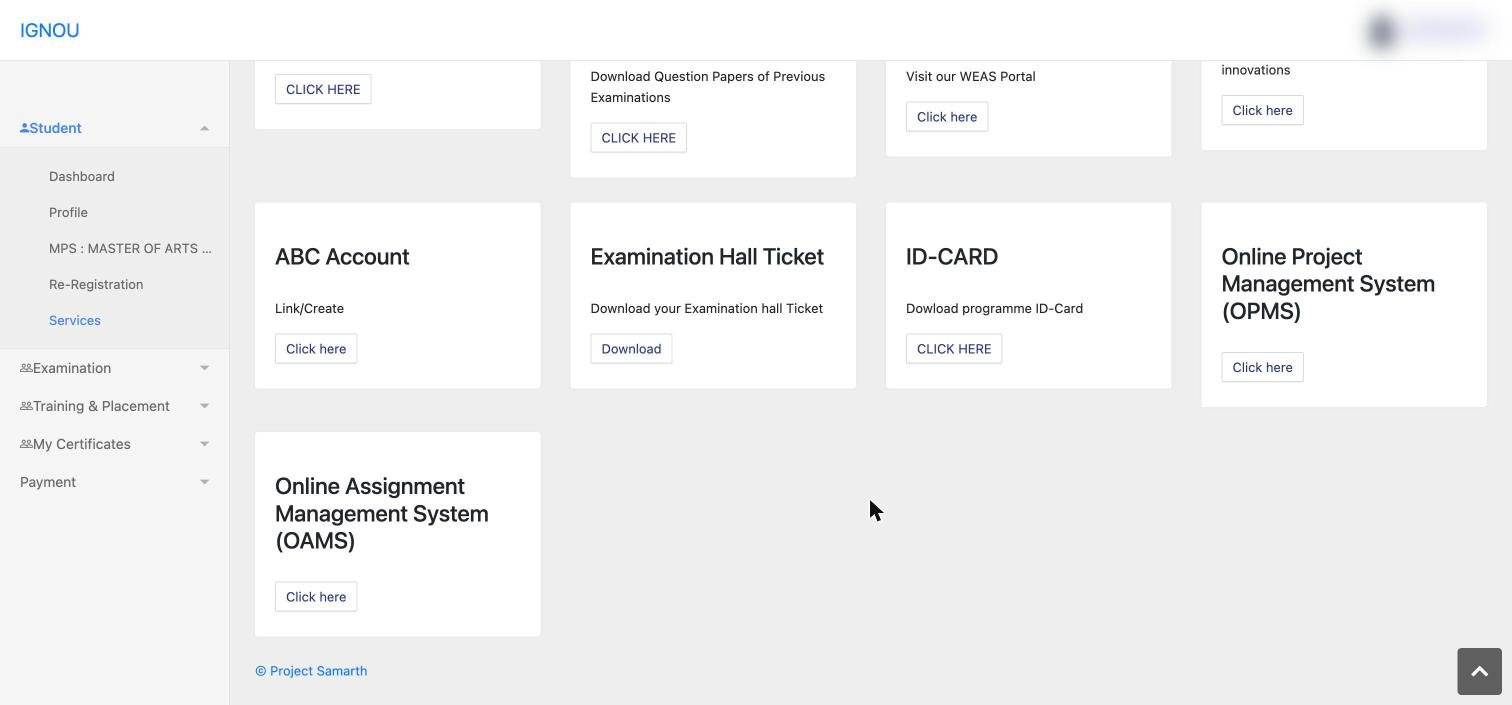
- Click “CLICK HERE” on the ID-CARD tileThe tile reads “Dowload programme ID-Card”. It sits next to Examination Hall Ticket.
- Find your programme in the tableThe “Programme ID-Card” page lists your programmes with a serial number and an Action column.
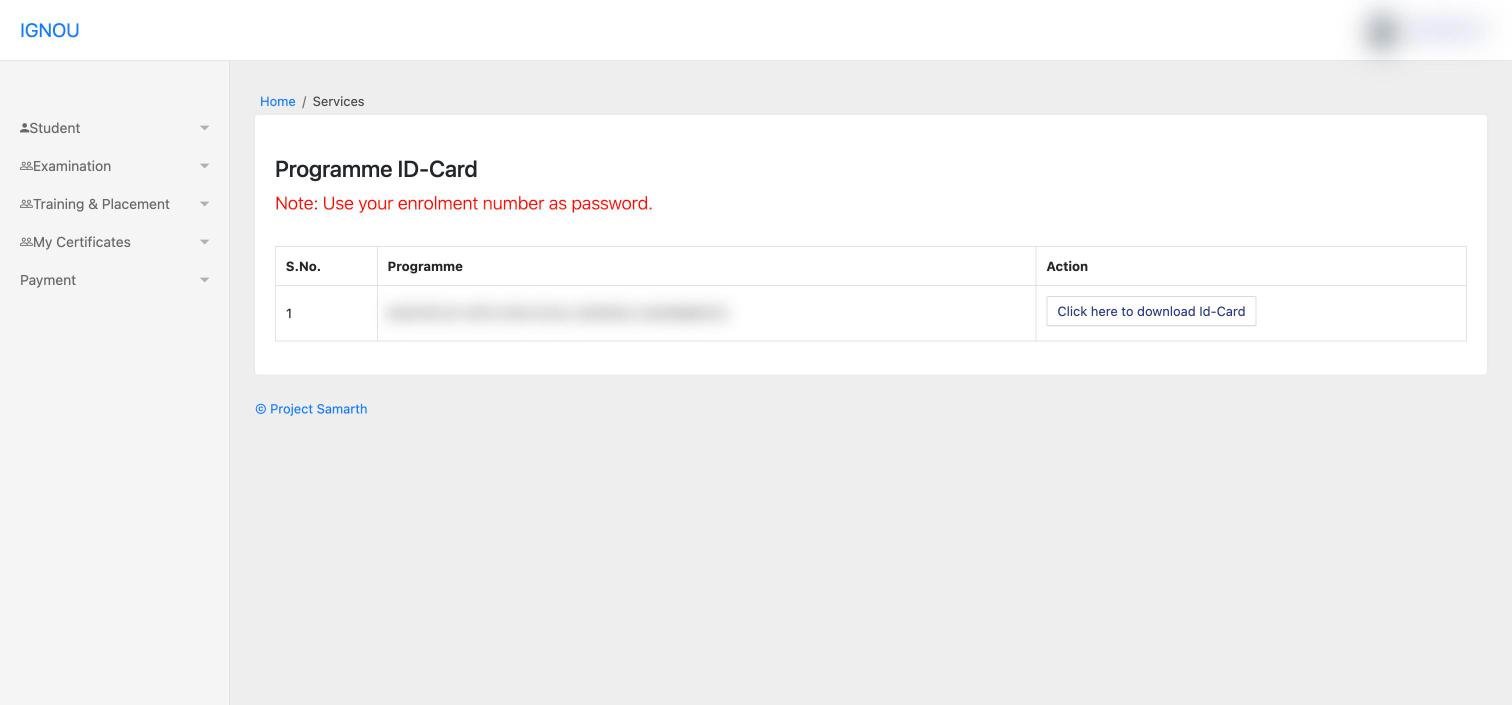
- Click “Click here to download Id-Card”The PDF downloads to your device.
- Open it with your enrolment numberEnter your enrolment number when the PDF asks for a password.
Opening the PDF: the password
The ID card page itself carries the instruction in red: “Note: Use your enrolment number as password.” This is not your portal password. Type the enrolment number exactly, with no spaces.
If the password is rejectedCheck that you are typing the enrolment number for the same programme whose card you downloaded. Students with more than one IGNOU enrolment often mix them up.
What to check on the card
Read every detail before you print. Errors are far easier to fix early than after exams or convocation.
- Spelling of your name and your parent’s name
- Enrolment number and programme
- Study centre and regional centre
- Photograph and signature
If anything is wrong, contact your regional centre with a copy of your admission documents. If it is still not resolved, raise a grievance on iGRAM (igram.ignou.ac.in).
Saving and printing
- Save the PDF in two places, for example your phone and an email to yourself.
- Print it in colour on A4 paper so the photograph is clear.
- Keep the printed copy with your hall ticket during exam season.
Where you will need it
The ID card is your proof of being an IGNOU student. One use is set out explicitly by IGNOU: if your degree, diploma or certificate was never received after convocation, the university’s degree delivery portal (IDMS) asks you to upload your IGNOU identity card along with your grade card or provisional certificate. Our convocation guide explains that process.
Keep it ready for exams, study centre visits and any office work at your regional centre, where staff may ask to see it.
Problems and fixes
I cannot log in to the portal
Use Reset Password on the login page. Our IGNOU login guide covers the common sign-in problems.
My programme is not listed on the ID card page
Check that your admission is confirmed on IGNOU’s registration status page. If it is confirmed and the programme still does not appear, contact your regional centre.
The PDF downloads but will not open
Open it with a different PDF reader, or download it on a computer. Make sure you are entering the enrolment number, not your portal password.
Frequently asked questions
What is the IGNOU ID card password?
Your enrolment number. IGNOU states this on the ID card download page.
Is there a fee to download the IGNOU ID card?
No. It is downloaded free from the Services section of the student portal.
Where is the ID card option in Samarth?
Student › Services › ID-CARD › “Click here to download Id-Card”.
I have two IGNOU programmes. Do I get two ID cards?
The ID card page lists programmes row by row, each with its own download button.
Can I use the ID card on my phone?
Keep a soft copy on your phone, but carry a printed copy for exams and office visits.
My details on the ID card are wrong. What should I do?
Contact your regional centre with your admission documents, and use iGRAM if the issue is not resolved.
Official links
IGNOU Student Portal (Samarth)ignou.samarth.edu.in
Registration statusisms.ignou.ac.in
iGRAM grievance portaligram.ignou.ac.in
Degree delivery portal (IDMS)onlineservices.ignou.ac.in/idms
See what else is inside the portal in our IGNOU student portal tour.