 © Copyright 2026 IGNOU Galaxy.

Home › Guides › IGNOU admission › Number not found
IGNOU Says Your Number "Does Not Exist"? Work Out Which Number and Which Portal First
AKBy Afjal Khan, COO, IGNOU Galaxy
Updated 12 November 2026 · 4 min read
A "does not exist" or "record not found" message does not, by itself, explain what happened to your admission record. Before you contact anyone, pin down three things: which portal you were on, which number that portal asked for, and the exact wording of the error. These details help you check for an input error, and give IGNOU what it needs to investigate.
The numbers you may have
IGNOU's portals don't all use the same name for the same thing, so follow the field label on the page in front of you rather than the name you remember. If an error mentions a "registration number", the field label on that portal tells you which number it means.
| Number | Where it comes from | Where you're likely to need it |
|---|---|---|
| Admission-portal username | Created when you register on the admission portal; sent to you by SMS and email | Logging in to ignouadmission.samarth.edu.in to finish, check or download your application |
| Control number | Generated for your application and payment | Quoting in a query about your application or payment, for example to the Centralised Student Registration Cell |
| Enrolment number | Issued when your admission is confirmed | Identifying your student record after admission: Samarth, the ID card, re-registration, exam forms and results. Some services also ask for a programme code or a separate account |
As a working rule: before confirmation, you're usually dealing with your username and control number; after confirmation, with your enrolment number.
Step 1: identify the portal and the field
Note the web address at the top of the page, the label of the box you typed into, and the full error message. Take a screenshot. Then check that the number you typed is the one that field asks for, and follow the account instructions shown on that portal.
Step 2: match your situation
Your admission isn't confirmed yet
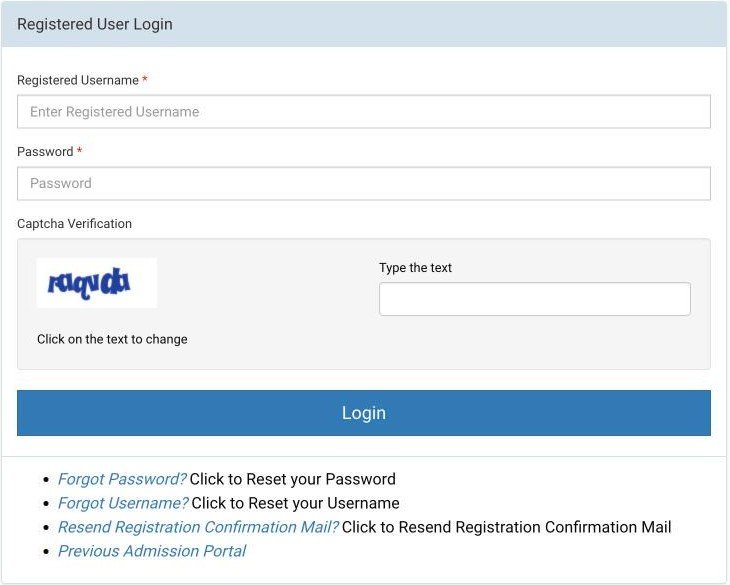
Log in to the admission portal (ignouadmission.samarth.edu.in) with your username and check the application status there. If you've forgotten the username or password, the portal has its own recovery links under the login box: Forgot Password, Forgot Username, and Resend Registration Confirmation Mail. Use the email address you registered with; a different one won't find your record.
You applied in an earlier cycle
Applications from earlier cycles may sit on the older system. The admission portal links to it as Previous Admission Portal, at the bottom of the login box.
Your admission is confirmed
Sign in to your Samarth student account (ignou.samarth.edu.in) with its registered username, and keep your enrolment number to hand to identify your student record. Our student portal guide covers sign-in problems.
You asked for a name correction and the record now isn't found
IGNOU's prospectus (section 14.23) says spelling mistakes made at data entry are corrected at the Regional Centre, and name changes are accepted only before the degree, diploma or certificate is awarded. Seeing this error after a correction request doesn't establish that the correction caused it. If a record can't be found after you've asked for a correction:
- Check you're using the number the portal's field asks for (Step 1).
- Contact the Regional Centre that handled your correction. Send a copy of your correction request, the date you submitted it, and your payment receipt. Our regional centres guide lists every RC's phone and email.
- If the RC doesn't respond, raise an iGRAM ticket under "Name Correction", quoting every number you have.
If money was deducted
A payment problem is a separate issue from a number that isn't found. If money left your account but the admission portal shows no payment acknowledgement, IGNOU's admission FAQ asks you to email your transaction details to the Centralised Student Registration Cell at csrc@ignou.ac.in (phone 011-29571528). Our admission guide sets out what to include and when to escalate.
When you contact IGNOU
Write one message with everything in it, sent only through an official channel (your Regional Centre's email, the CSRC email above, or iGRAM). Never share your password or an OTP.
| Include | Example of what to write |
|---|---|
| Portal address | ignou.samarth.edu.in |
| Exact error | Copy the message word for word, and attach the screenshot |
| Name as on your form, programme and admission cycle | Programme code and "January 2026" |
| The number you used | Say which one: username, control number or enrolment number |
| Date of any correction request | The date you submitted it at the RC |
| Payment reference | Transaction ID, date and amount, if a payment is involved |
| Previous complaint number | Your earlier iGRAM ticket or email date, if any |
Our iGRAM guide shows how to word a ticket.
Sources checked 12 November 2026
- IGNOU admission portal FAQ (payment issues, Centralised Student Registration Cell)
- IGNOU Common Prospectus, July 2026 (name corrections, section 14.23)
- IGNOU admission portal (recovery links, previous portal)
- iGRAM (grievance categories)