 © Copyright 2026 IGNOU Galaxy.

IGNOU Login with Enrolment Number: Which Portal Needs What
IGNOU does not have a single login. Some services open with just your enrolment number, while others need a username and password on the Samarth student portal. This guide lists every common service, exactly what each form asks for (checked on the live pages), and how to get back in if you are locked out.
Two kinds of IGNOU login
Enrolment-number lookupsPublic pages where you type your enrolment number (sometimes with a programme code or session) and see your record. No password.
Account loginsPortals where you create a username and password: the Samarth student portal, the admission portal and the re-registration portal. Each keeps its own account.
Services that need only your enrolment number
| Service | Website | What the form asks for |
|---|---|---|
| Grade card status | gradecard.ignou.ac.in | Programme group, programme code, enrolment number |
| Term-end and re-evaluation results | termendresult.ignou.ac.in | Result type (TEE or re-evaluation), session, enrolment number |
| Study material dispatch status | gradecard.ignou.ac.in/mpddstatus (one page per session) | Enrolment number only |
| Admission / registration details | isms.ignou.ac.in | Enrolment number, programme code and a captcha |
Each of these has its own detailed guide on our site: grade card status, term-end result and book status.
Logging in to the Samarth student portal
Most of what you do as an enrolled student, such as exam forms, hall tickets, the ID card and your course list, happens on the student portal at ignou.samarth.edu.in.
- Open ignou.samarth.edu.inThe page is headed “Indira Gandhi National Open University, Student Portal”.
- Enter your username and passwordUse the details you created at New Registration.
- Type the captchaClick the captcha text to get a new one if it is hard to read.
- Click LoginYou land on the dashboard. The top-right corner shows your account identifier, with Logout below it.
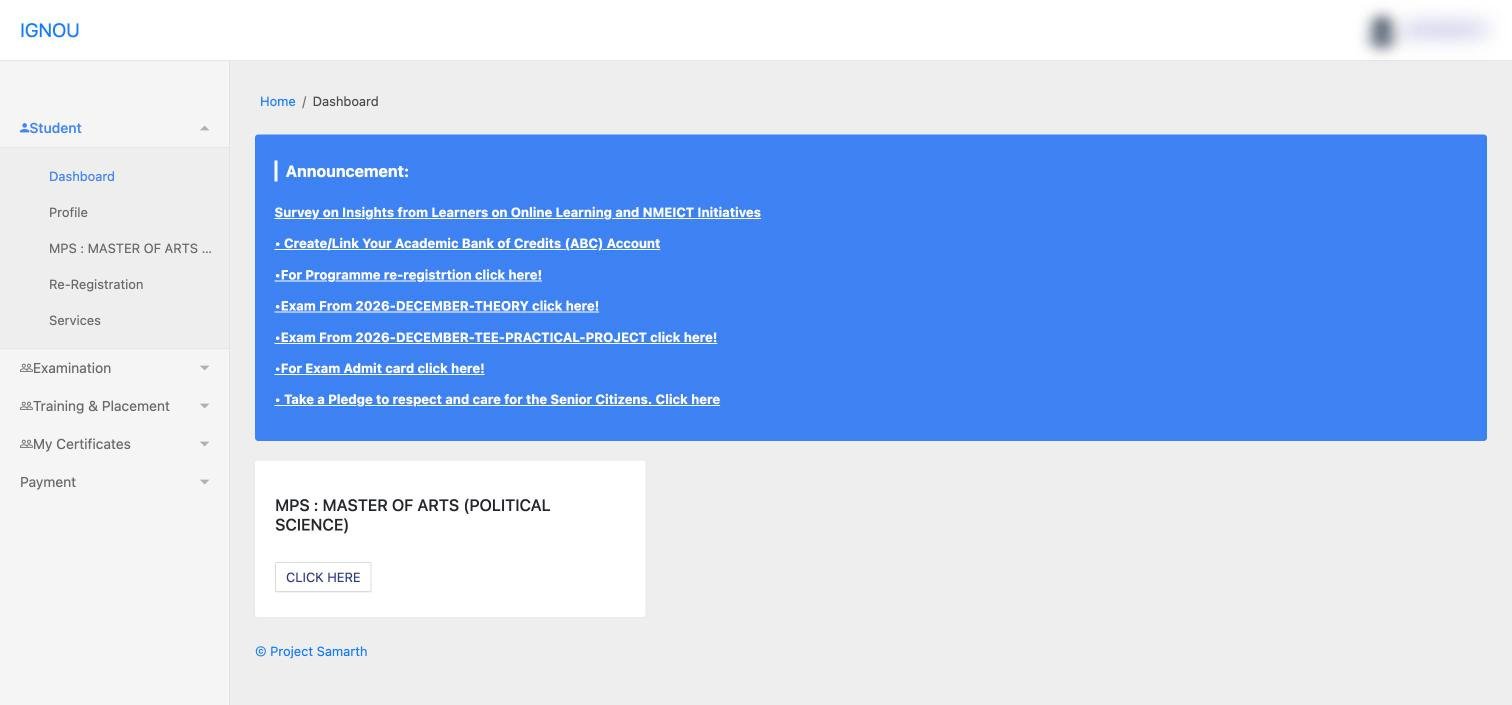
For a full tour of what is inside, see our IGNOU student portal guide.
First-time registration on the student portal
If you have never logged in, click New Registration on the login page and create your account. Give a mobile number and email address you use regularly, since IGNOU sends confirmations and updates to them.
Not the same as your admission loginThe username you made on the admission portal (ignouadmission.samarth.edu.in) belongs to that portal. If the student portal does not accept it, register on the student portal itself.
Forgot your password or username
| Portal | Recovery options on the login page |
|---|---|
| Student portal (ignou.samarth.edu.in) | Reset Password |
| Admission portal (ignouadmission.samarth.edu.in) | Forgot Password, Forgot Username, and Resend Registration Confirmation Mail |
| Re-registration portal (onlinerr.ignou.ac.in) | IGNOU says that if you are not getting the OTP or have forgotten your username or password, your regional centre resets the account or updates your email and mobile number |
Where to find your enrolment number
- The admission confirmation sent to your registered email
- Your IGNOU ID card. The ID card PDF itself opens with your enrolment number as the password (see our ID card guide)
- The programme page on the student portal, which lists it next to your name
- Your grade card and hall ticket
Keep it written down somewhere safe. Almost every IGNOU service, form and complaint starts with it.
Login problems and fixes
“Invalid captcha”
Click the captcha to load a fresh one and type it exactly, including upper and lower case.
My details are correct but login fails
Check that you are on the right portal: student portal, admission portal and re-registration portal accounts are separate. Then use Reset Password.
Not receiving the OTP or reset email
Your registered mobile number or email may be outdated. Contact your regional centre to update them.
The page does not load near a deadline
IGNOU’s portals are busiest just before exam form, re-registration and admission deadlines. Log in early in the window, and try again a little later if a page times out.
Keeping your account safe
- Type the portal address yourself. Lookalike sites copy the Samarth design to collect logins.
- Never share your password or OTP with agents, cyber cafés or WhatsApp groups.
- Click Logout when you finish, especially on shared computers.
- Pay fees only on the official portals and keep screenshots of every payment.
Frequently asked questions
Can I log in to IGNOU with only my enrolment number?
For lookups such as grade card status, term-end results and study material status, yes: no password is asked. For the Samarth student portal, you need a username and password.
What is the official IGNOU student login website?
ignou.samarth.edu.in, the IGNOU student portal on the Samarth platform.
Is my admission portal username the same as my student portal username?
They are separate portals with separate accounts. If one is not accepted, register or reset on that specific portal.
How do I reset my IGNOU student portal password?
Click Reset Password on the ignou.samarth.edu.in login page and follow the steps.
What do I need to check my IGNOU registration status?
Your enrolment number, your programme code and the captcha on the registration details page at isms.ignou.ac.in.
Where can I see my enrolment number after logging in?
On your programme page in the student portal, which lists your name, enrolment number and study centre.